
A great label printer
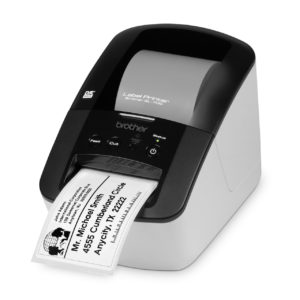
The Brother QL-700 is a cheap and widely-available thermal label printer which is perfect for printing product barcodes and price labels. As of early 2019 it is available from Officeworks for just $99.
The DK-11209 address labels (29x62mm) are an ideal size for accommodating long product barcodes and still having space for a description. Generic versions of the labels are available very cheaply from eBay.
Template Code
Neto’s default barcode template needs to be modified to suit this label size. In All settings & tools > Document Templates, edit the template under Print Templates \ product \ barcode
[%product preview:'y' sku:'[@SKU@]'%][%param *body%]
<table border=0 align=center width=320 style="margin:0">
	<tr>
		<td style="font-size:17px;">
			<b>$[@store_price@]</b>
			[%product sku:'[@sku@]' group_id:'2'%]
				[%param *body%]
					(VIP: $[@store_price@])
				[%/param%]
			[%/product%]
		</td>
		<td align=right style="font-size:17px;">
			[@SKU@]
		</td>
	</tr><tr>
		<td colspan=2 align=center><img src="[%BARCODE_URL fn:'' height:'65' sku:'[@SKU@]' upc:'[@upc@]' scale:'1'%][%END BARCODE_URL%]" style="width: 300px; height: 65px;" border="0"/></td>
	</tr>
	<tr>
		<td colspan=2 align=center>
			<div style="font-size:12px; height: 28px;">
				[@model@]
			</div>
		</td>
	</tr>
</table>
[%/param%][%/product%]
The highlighted lines show an optional section of code which looks up a specific price group (like a VIP/loyalty member price), here using group ID 2.
Creating labels
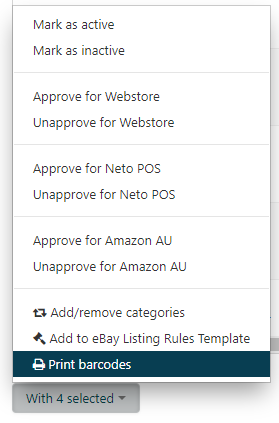
To print labels, filter to the products and tick each one to be printed. At the bottom of the page select With x Selected and then Print Barcodes.
When printing to the QL-700 through Chrome, you must select select minimum margins and disable headers & footers.

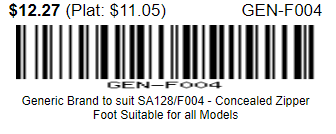
Finished Result

Using multiple templates
If you have FTP access you can upload a new template file to /private/www/netosuite/SysDoc/printdocs/product/barcode, or multiple files to support different label sizes. The selected template can be changed in All settings & tools > Advanced Configuration. Set
PRINT_BARCODELABEL_TEMPLATE to the name of the template (without .html)